Sprint Planning Checklist: 10 Steps to Cut Meeting Time
Use this 10-step sprint planning checklist to prepare your backlog, calculate capacity, timebox meetings, and use AI to cut planning to 1–2 hours.
Sprint planning often takes longer than it should. Here’s why: most teams spend 90% of their meeting time on tasks better suited for backlog grooming, like debating minor details or clarifying vague user stories. Add unclear requirements and poor preparation, and meetings drag on unnecessarily.
The solution? A 10-step checklist that focuses on preparation, time management, and automation. Key highlights include:
- Timeboxing: Limit planning to 2 hours per sprint week.
- Preparation: Refine the backlog and calculate team capacity beforehand.
- Automation: Use AI tools like Echother to handle repetitive tasks, generate tickets, and provide real-time insights.
By following these steps, you can reduce sprint planning to just 1–2 hours while maintaining quality. Teams using AI tools report a 35% cut in planning overhead and 60% faster estimation sessions.
Ready to save time? Let’s dive into the details.
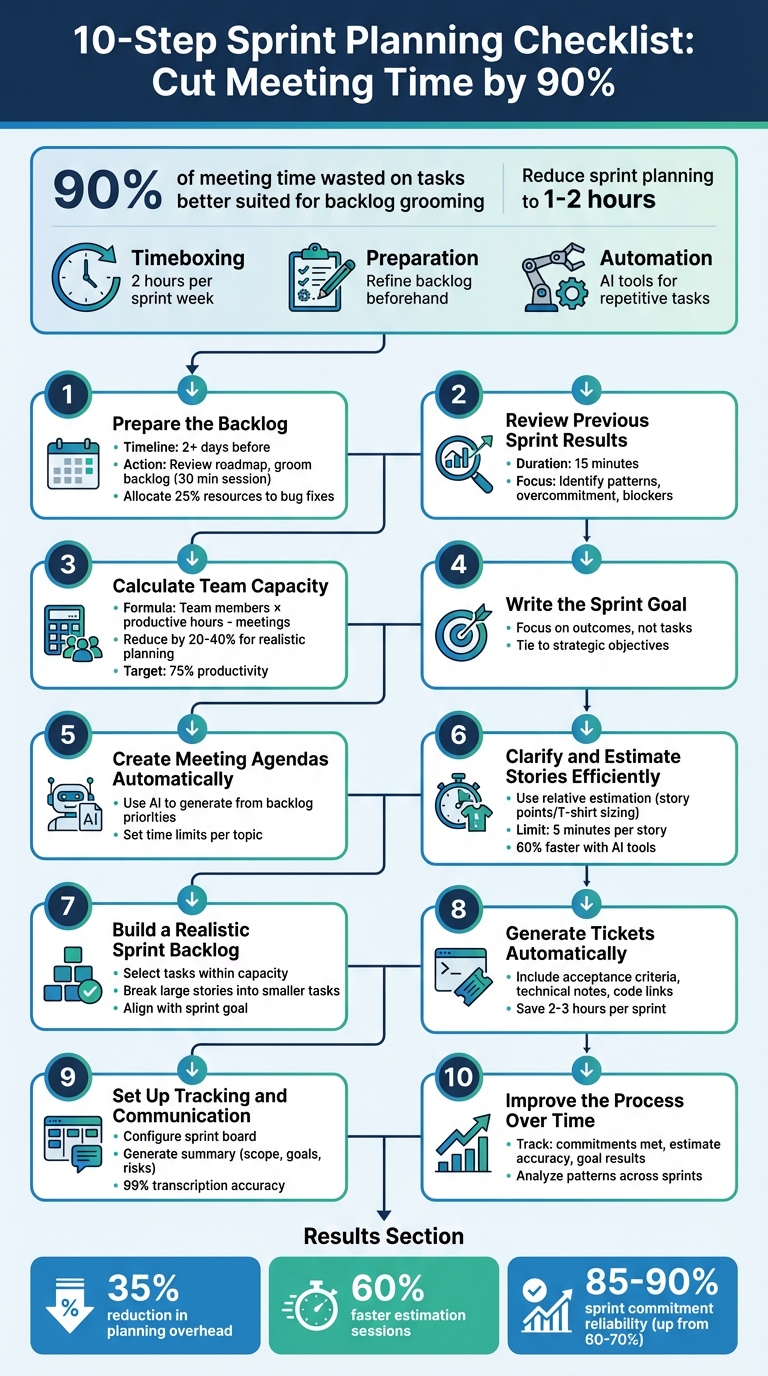
10-Step Sprint Planning Checklist to Reduce Meeting Time
Sprint Planning Meetings | 12 Tips To Run Them Like a Scrum Pro
Basic Principles for Faster Sprint Planning
Efficient sprint planning hinges on three key principles: sticking to strict time limits, preparing thoroughly ahead of time, and leveraging automation tools. When executed well, these strategies can turn lengthy, disorganized meetings into streamlined sessions that set clear and realistic goals. Here’s how each principle contributes to better planning.
Set Time Limits for Sprint Planning
Sprint planning should follow a strict timebox: no more than two hours for each week of the sprint. For instance, a two-week sprint should take no longer than four hours to plan[1][3]. Dave West, CEO of Scrum.org, explains:
"A timebox is a maximum time allowed; there is no minimum time allowed"[1].
To keep things moving, break the meeting into clear segments: review the sprint goal and team capacity, discuss high-priority items, and finalize commitments. If any topic runs over its allotted time, it’s better to defer it to a follow-up session than to derail the entire meeting.
Prepare Before the Meeting
Preparation is the backbone of an efficient sprint planning session. A mid-sprint refinement meeting can help ensure the backlog is in good shape before planning begins. The Product Owner should come prepared with a proposed sprint goal and a prioritized list of high-priority items[6]. Make sure all stories meet your team’s Definition of Ready, meaning they are well-estimated, prioritized, and include clear acceptance criteria[4].
It’s also a good idea to update sprint boards the day before the meeting to avoid wasting time on administrative tasks. Don’t forget to calculate team capacity in advance, factoring in vacations, holidays, and recurring meetings[3]. Aiming for 75% productivity helps account for breaks and other non-work activities. With thoughtful preparation, many teams can reduce sprint planning to just one or two hours[4].
Use AI to Automate Tasks
AI tools can take care of repetitive tasks that often bog down sprint planning. For example, Echother can generate meeting agendas based on backlog priorities and past sprint data, allowing your team to focus directly on decision-making. During the session, real-time transcription captures key points with impressive 99% accuracy, so no one has to waste time taking notes.
AI can also speed up estimation. By analyzing historical Git data and pull request patterns, tools like Echother can suggest story point estimates, cutting estimation time by up to 60%[7]. After the meeting, the platform can generate production-ready JIRA tickets with technical specifications, saving teams 2–3 hours during the refinement phase[7]. By automating these tasks, AI frees up your team to focus on the bigger picture - strategy and collaboration.
10-Step Sprint Planning Checklist
This guide takes you through sprint planning from start to finish, cutting out unnecessary steps that often drag meetings on for too long. Each step is built on solid preparation and smart automation, helping you save time and focus on what matters.
Step 1: Prepare the Backlog
Start by reviewing your product roadmap to ensure the sprint aligns with your long-term goals. This keeps your team from just "checking boxes" without contributing to bigger objectives[9]. Schedule a 30-minute backlog refinement session a few days before sprint planning to prioritize issues for the next two sprints[9][5]. Use this time to make sure high-priority tasks are at the top, and user stories are clear and well-defined.
Break down larger tasks into smaller, manageable pieces with clear acceptance criteria that define what "done" means. Checklists can help stakeholders confirm completion[8][9]. Experts suggest allocating about 25% of sprint resources to bug fixes and code refactoring to sustain future productivity[9][4]. Also, handle any leftover tasks from the previous sprint - decide if they’re still valuable or should return to the backlog[4].
Here’s a quick timeline to prep effectively:
- Review Roadmap – 2+ days before
- Backlog Grooming – 2–3 days before
- Update Sprint Boards – 1 day before
- Draft Agenda – 1 day before
- Calculate Capacity – at planning start
Tools like Echother can analyze past discussions and structure user stories automatically, ensuring no valuable context is lost between refinement and planning.
Step 2: Review Previous Sprint Results
Take 15 minutes to recap the previous sprint’s goals, completed work, and unfinished tasks. Focus on identifying patterns like overcommitment or recurring blockers, rather than diving into every detail.
Echother can extract insights from past retrospectives, highlighting themes like inconsistent estimates or repeated technical debt. These insights help you make smarter adjustments moving forward. With a clear understanding of past performance, you’ll be ready to assess your team’s current capacity.
Step 3: Calculate Team Capacity
Figure out your team’s realistic capacity by calculating available work hours. Account for working days, holidays, and non-feature work. Multiply the number of team members by productive daily hours, then subtract time for meetings and other commitments[3]. Many teams reduce theoretical capacity by 20% to 40% to account for downtime and unexpected issues[9]. Aiming for around 75% productivity is a good rule of thumb[3]. Echother can analyze past sprint data to suggest realistic capacity limits tailored to your team.
Step 4: Write the Sprint Goal
Craft a clear and concise sprint goal that ties into your strategic objectives. The goal should answer: What value will we deliver to users or stakeholders by the end of this sprint? Focus on outcomes, not just tasks. For example, instead of saying, "Complete 15 user stories", aim for something like, "Enable users to export their data in multiple formats."
The Product Owner should propose a draft goal before the meeting, allowing the team to refine it together for better alignment. Echother can summarize discussions from backlog refinement sessions into a cohesive goal statement.
Step 5: Create Meeting Agendas Automatically
Set up a structured agenda with time limits for each topic to keep the meeting on track. Digital tools with built-in agenda features can ensure no steps are missed. Use AI to auto-generate an agenda based on backlog priorities, saving time and effort.
Step 6: Clarify and Estimate Stories Efficiently
Focus on items critical to the sprint goal and those needing further clarification. Stories that meet your Definition of Ready should require minimal discussion[10]. When reviewing backlog items, emphasize the problem and customer impact rather than diving into technical details[1][10].
Use relative estimation methods like story points or T-shirt sizing (e.g., XS to XXL) to assess effort based on complexity rather than time[1][3][10]. For faster results, try silent estimation - team members assign estimates simultaneously, discussing only items with major disagreements[5]. Limit discussions to 5 minutes per story. Echother’s voice agent can provide real-time technical context, minimizing interruptions.
Step 7: Build a Realistic Sprint Backlog
Select tasks that fit within your team’s capacity and risk tolerance. If a story is too large for one sprint, break it into smaller, independent tasks during planning[3][5]. Ensure each selected item directly supports the sprint goal.
Step 8: Generate Tickets Automatically
Create production-ready tickets for each selected item, complete with acceptance criteria, technical notes, and code links. Manually crafting detailed tickets after planning can be time-consuming, especially for complex features.
Echother simplifies this process by generating detailed tickets linked to your repositories. Its smart ticket-splitting feature can also break down large stories into smaller technical tasks by analyzing your codebase.
Step 9: Set Up Tracking and Communication
Before work begins, configure your sprint board with the right statuses, swimlanes, and filters. Summarize the sprint plan, including its scope, goals, risks, and key decisions. This summary serves as a handy reference throughout the sprint.
Echother can automatically generate this summary and sync it with tools like JIRA and Slack. With its 99% transcription accuracy, the platform captures key decisions so team members who missed the meeting can catch up quickly.
Step 10: Improve the Process Over Time
After each sprint, evaluate your planning process. Were all commitments met? Were estimates accurate? Did the sprint goal deliver the intended results? Tracking these metrics over time helps you refine your approach.
Echother can analyze patterns across planning sessions, offering suggestions to make your process more efficient and accurate with every sprint.
How AI Improves Sprint Planning
AI takes the hassle out of backlog grooming and lengthy estimation sessions, transforming them into efficient, data-driven processes. Instead of spending hours debating estimates or manually sorting through backlogs, teams can lean on AI to handle much of the grunt work. This includes analyzing past data, generating detailed tickets, and identifying potential issues before they escalate. It’s a seamless addition to the planning workflow, saving time and boosting productivity.
Organizations using AI-powered agile tools report some impressive results: a 35% reduction in planning overhead, a 60% cut in estimation meeting durations, and 2–3 hours saved per sprint during refinement tasks[7]. On top of that, teams have seen their sprint commitment reliability jump from 60–70% to an impressive 85–90%[11].
"The difference between our planning sessions before and after implementing AI tools is night and day. What used to take hours now takes minutes, and our velocity - the average story points completed per sprint - has become much more predictable." – Engineering Leader, Spotify[7]
A great example comes from Dapper Labs, the creators of NBA Top Shot. In July 2025, they introduced AI planning tools and saw a 40% boost in epic completion rates. This improvement was largely due to reduced time spent in estimation meetings and better-organized sprints overall[7].
Echother takes AI-driven planning to another level. It connects directly to your codebase, offering real-time technical insights during planning sessions. Its voice agent provides context on the fly, while repository-aware ticket generation ensures stories are backed by accurate technical details. With 99% transcription accuracy, the platform also logs key decisions and context, making it easy for team members to catch up if they miss a meeting.
Manual vs. AI-Assisted Planning
Here’s a side-by-side look at how AI reshapes sprint planning:
| Aspect | Traditional Manual Planning | AI-Assisted Planning |
|---|---|---|
| Preparation Time | Hours spent manually grooming and prioritizing the backlog[7] | Minutes, as AI identifies high-value items and flags dependencies[7] |
| Meeting Duration | Lengthy discussions for consensus using Planning Poker[7] | Up to 60% faster with data-driven baseline estimates[7] |
| Estimation Basis | Subjective, based on individual experience and bias[11] | Objective - grounded in historical Git data and completion trends[7][11] |
| Capacity Planning | Often overlooks partial allocations or seasonal trends[11] | Accounts for availability, skills, and historical velocity[11] |
| Ticket Quality | Inconsistent descriptions and acceptance criteria[7] | AI generates precise summaries from rough requirements[7] |
| Risk Management | Reactive; blockers discovered mid-sprint[7] | Proactive; AI flags dependencies and potential risks early[7] |
AI doesn’t just make planning faster - it makes it smarter, helping teams focus on delivering value rather than getting bogged down in the details. By automating repetitive tasks and providing data-driven insights, AI transforms how teams approach sprint planning.
Conclusion
Sprint planning doesn’t have to be a drawn-out process. The 10-step checklist we’ve explored demonstrates how preparation, smart use of automation, and data-driven decisions can slash meeting times significantly. By refining your backlog mid-sprint, leveraging historical velocity to calculate capacity, and letting AI handle repetitive tasks, you can cut down up to 90% of wasted time in these meetings.
With a well-organized backlog and the right tools, your sprint planning sessions could take as little as 5–15 minutes[2]. This means your team can spend more time focusing on delivering impactful work rather than getting bogged down in lengthy discussions.
Echother's AI-powered platform simplifies the process even further. Features like 99% transcription accuracy, repository-aware ticket generation, and a voice agent providing real-time context from your codebase take the manual effort out of planning. These tools free up your team to focus on making strategic decisions that add real value.
Start with automating agenda creation or tapping into historical capacity data. Over time, these small updates can lead to noticeable improvements in both meeting efficiency and sprint outcomes.
Put these strategies into action and see how your sprint planning transforms.
FAQs
How does Echother use AI to make sprint planning more efficient?
Echother uses AI to make sprint planning faster and easier by taking care of essential tasks automatically. It can create sprint agendas, rank backlog items by priority, and summarize meeting discussions, all of which save teams a significant amount of time. On top of that, it delivers insights and reports based on data, keeping teams on track to achieve their goals while cutting down on manual work. These features help streamline the planning process and adapt to your team's specific requirements.
How can I effectively prepare for a sprint planning meeting?
To get ready for a sprint planning meeting, start by polishing up the product backlog. Make sure the high-priority items are well-detailed, appropriately sized, and ready for discussion. A backlog grooming session a day or two before the meeting can help with this. Then, establish a clear sprint goal - this should highlight the business value your team aims to achieve, keeping everyone on the same page.
Next, evaluate your team’s capacity by considering factors like holidays, meetings, and individual availability. With this in mind, select and prioritize backlog items that your team can realistically tackle during the sprint. Once the items are chosen, break them down into actionable tasks, estimate the effort involved, and decide who will take ownership or clarify responsibilities for each task. Finally, ensure the meeting facilitator is prepared, and all necessary tools are ready and accessible to support smooth updates and collaboration.
By tackling these steps ahead of time, you’ll create a strong starting point for a productive sprint planning session, helping your team stay organized and focused.
What are the benefits of timeboxing in sprint planning?
Timeboxing is a practical way to keep sprint planning sessions sharp and efficient. By setting a firm time limit, it curbs lengthy debates, pushes the team to prioritize tasks, and keeps everyone aligned toward achieving actionable goals.
This structured approach creates a clear framework for the meeting, boosting productivity and helping teams make quicker decisions without sacrificing collaboration or momentum.