How AI Generates PR Tickets from Codebases
AI converts code diffs and meeting context into accurate, standardized PR tickets that speed reviews and improve sprint planning while requiring human review.
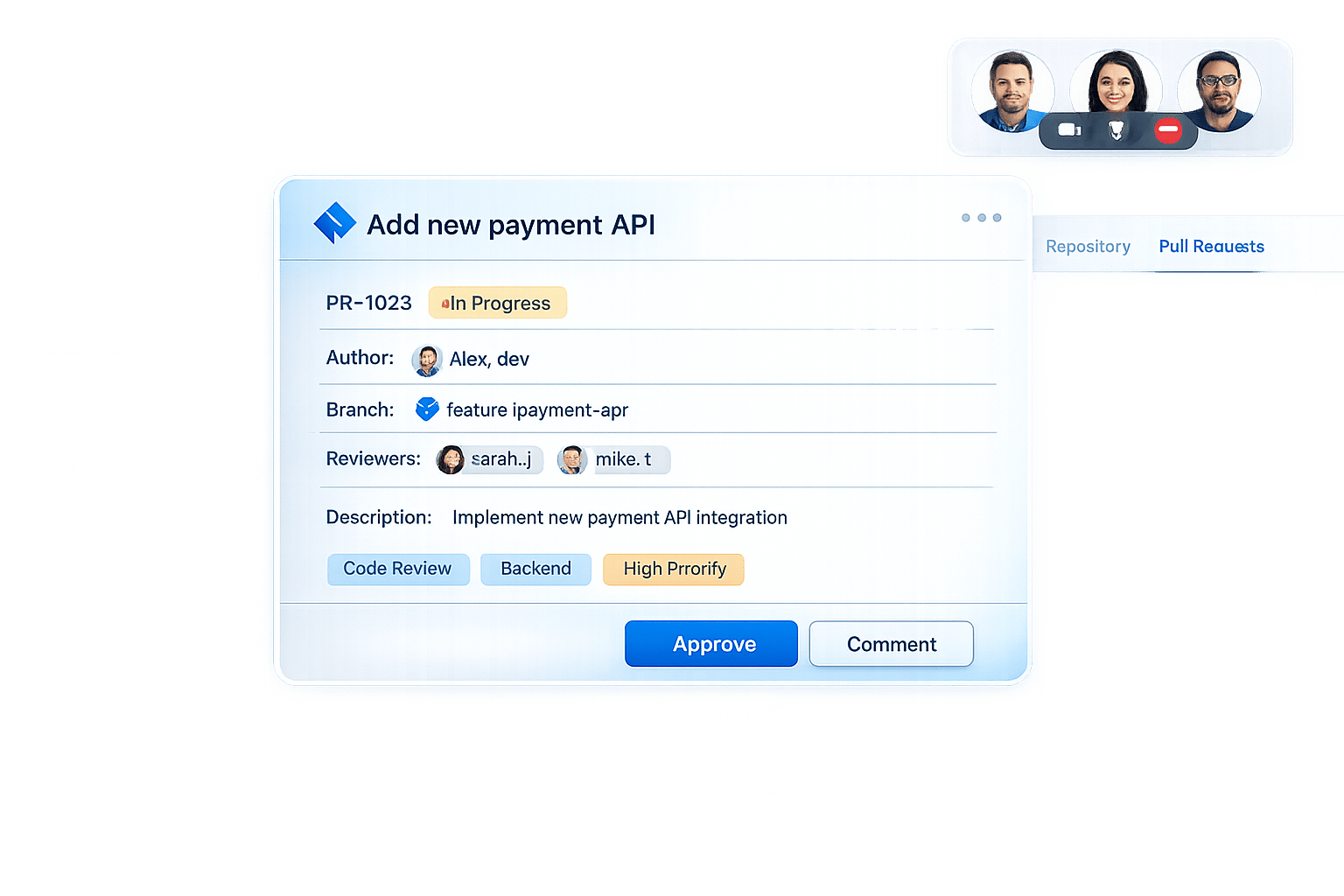
AI-generated PR tickets streamline the process of documenting code changes by analyzing code diffs, commit messages, and metadata. These tickets are created in seconds and include summaries, impacted files, technical details, and testing instructions. By automating this task, teams save time, ensure consistency, and improve collaboration. Tools like Echother even integrate meeting insights for added context, reducing planning overhead and enhancing workflows.
Key points:
- Speed: Tickets generated in ~40 seconds.
- Accuracy: AI analyzes code diffs, dependencies, and repository rules.
- Integration: Links to tools like GitHub and Jira for seamless workflows.
- Efficiency: Saves hours in sprint planning and reduces bottlenecks.
- Governance: Requires human review and includes security measures.
AI tools like Echother make PR ticket creation faster, clearer, and more aligned with team workflows, helping developers focus on coding while maintaining high documentation standards.
How AI Analyzes Codebases to Generate PR Tickets
Gathering Context for Accurate PR Tickets
AI doesn't just look at a simple diff when analyzing code changes - it takes a deeper dive. It collects the raw diff, the full contents of the files involved, nearby code, and even semantically related sections. This layered approach helps the AI grasp not only what changed but also why those changes matter [9].
To go beyond the code itself, advanced AI tools factor in repository-specific rules like contribution guidelines and pull request (PR) templates. These additional inputs ensure that the generated ticket aligns with the team’s existing workflows. Once all this context is collected, the AI uses advanced parsing and static analysis to turn it into actionable insights.
Techniques AI Uses to Analyze Code
The process begins with event-driven triggers, such as webhooks or GitHub Actions, which activate whenever a pull request is opened or a commit is pushed [8][11]. Once triggered, the AI retrieves the code diff and uses abstract syntax trees (ASTs) to break it down into its core components [8].
Before involving any language models, static analysis tools like ESLint or flake8 scan the code for syntax errors and style issues. Security-focused tools, such as CodeQL, check for vulnerabilities [8][10]. By addressing basic problems upfront, these tools ensure that the input for the next stage is clean and ready for deeper analysis. At this point, large language models (LLMs) step in to examine the code, identifying developer intent, logical patterns, and potential maintainability challenges [8][11].
Some advanced systems use Retrieval-Augmented Generation (RAG) to search the repository for related code snippets [9]. They might also rely on tools like a DocstringIndexer to detect design patterns and locate similar implementations. This helps the AI gain a more holistic understanding of the codebase.
After completing its analysis, the AI organizes its findings and prepares to draft a detailed pull request ticket.
Turning Code Diffs into Structured PR Tickets
Once the AI has gathered all the necessary context, it uses a hierarchical summarization pipeline to transform raw diffs into well-structured tickets [13]. It starts by creating summaries for each modified file, highlighting the key changes and their functionality. These file-level summaries are then combined into a broader pull request overview, which details the impacted components, technical implications, and any testing requirements.
To ensure the changes align with the original goals, the AI maps the code modifications back to the requirements outlined in linked tasks, such as Jira or Azure DevOps tickets [12][14]. This step validates whether the implementation meets the acceptance criteria. Additionally, the system performs an impact analysis, using symbol usage maps and repository graphs to flag potential risks or dependencies that reviewers might need to consider.
The results speak for themselves. Teams using AI-powered review tools have seen review feedback times shrink from about an hour to just 90 seconds - a 40x improvement. On top of that, approximately 67% of the AI-suggested changes are implemented, and 96% of the generated comments receive positive feedback [11].
Step-by-Step Workflow for AI-Generated PR Tickets
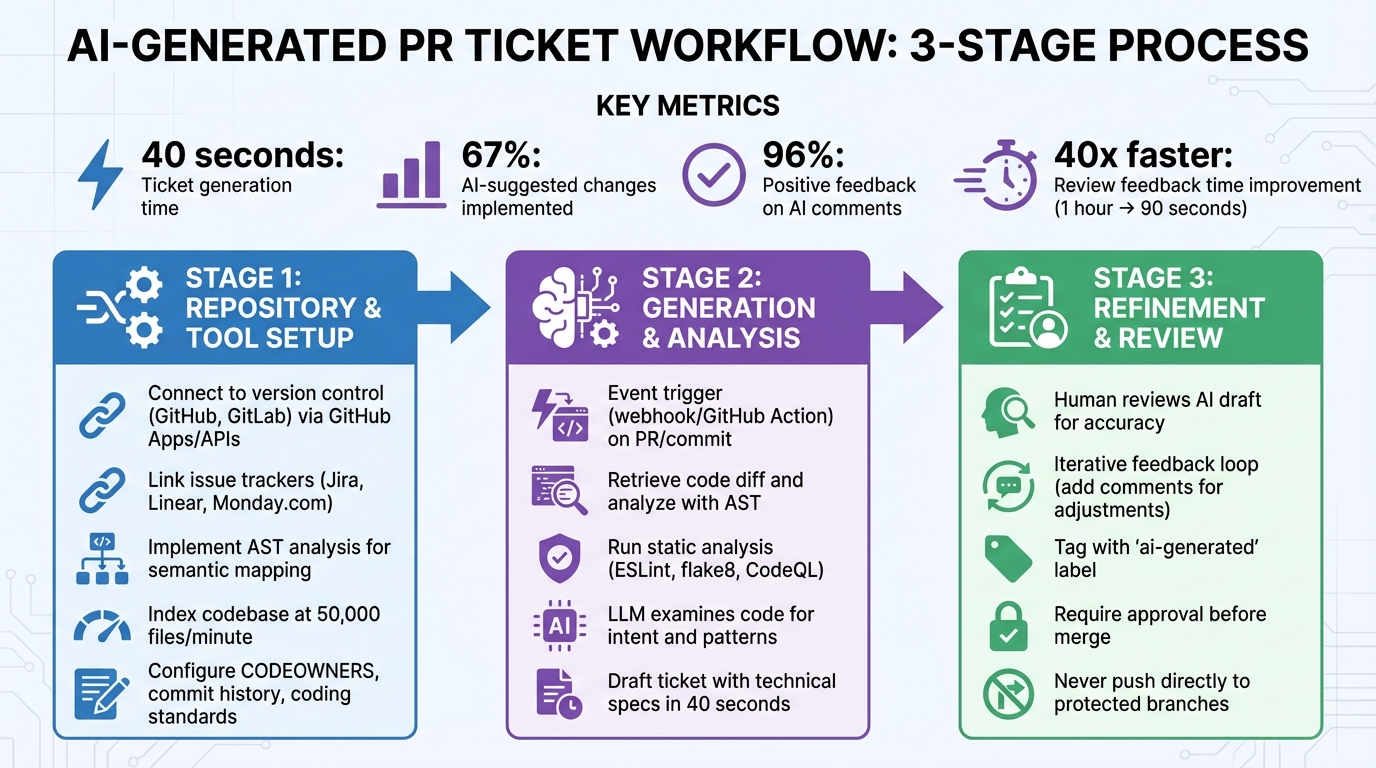
AI PR Ticket Generation Workflow: From Code Commit to Structured Ticket
Repository and Tool Setup
To get started, connect your AI system to your version control platform and issue tracker. This involves authenticating through methods like GitHub Apps, personal access tokens, or APIs such as Octokit. These connections enable the AI to interact with tools like GitHub, GitLab, Jira, Linear, or Monday.com, allowing it to access your repository structure and draft tickets [3][1][19].
Next, set up codebase contextualization. This means implementing tools like "code walkers" or Abstract Syntax Tree (AST) analysis to generate a semantic map of your repository [15][16]. The AI needs to understand function callers, dependencies, and architectural patterns. Advanced systems can process and index codebases at speeds of about 50,000 files per minute [16].
Automated indexing is another essential step. Configure it to capture metadata such as CODEOWNERS, commit history, and directory structures [16]. Additionally, establish repository-level instructions that outline coding standards, testing requirements, and files to exclude [17].
Generating and Refining AI PR Tickets
The process begins with event triggers, such as webhooks or GitHub Actions, which activate when a pull request is opened or a commit is pushed. Once triggered, the AI retrieves the code diff, analyzes it using AST, and runs static analysis tools to identify errors and vulnerabilities. From there, it drafts a detailed ticket.
These tickets go beyond standard templates by including technical specifications like purpose, architectural constraints, data contracts, failure modes, and explicit test expectations [16][18]. However, human review remains essential. Developers must refine the AI's drafts, ensuring titles, problem descriptions, reproduction steps, and acceptance criteria are clear and actionable [4].
"If your team can't explain the AI's code in plain English, it doesn't ship." - Deepayan-Thakur, GitHub Community [21]
To refine AI-generated tickets, teams can engage in an iterative feedback loop. For instance, adding comments like "include repro steps" or "localize these pages" prompts the AI to adjust its output in a follow-up session [4][20]. It's critical that the AI only creates draft PRs and never pushes directly to protected branches like main or release [21]. To maintain transparency, tag all AI-generated PRs with labels such as ai-generated [21].
Now, let’s take a closer look at how Echother enhances this workflow by incorporating meeting insights.
How Echother Streamlines the Workflow
Echother takes ticket refinement a step further by integrating insights from team discussions. During sprint planning meetings, Echother records conversations with 99% accuracy and interprets the context of your codebase in real time. Instead of manually converting meeting notes into tickets, Echother automatically generates PR tickets that align with the discussions.
The platform supports up to five repositories on the Team plan and unlimited repositories on the Enterprise plan, integrating seamlessly with GitHub and Jira. During meetings, Echother’s voice agent can answer real-time questions like "Where is authentication handled?" without requiring anyone to leave the discussion. This context is then directly incorporated into the tickets, which include technical details, acceptance criteria, and even auto-generated diagrams.
For a company with 200 engineers, automating repetitive coordination tasks like these can save significant time - equating to approximately $4.5 million in annual productivity gains [16]. Echother’s repository-aware intelligence ensures that tickets are not just accurate but also aligned with sprint goals and architectural guidelines.
Benefits of AI-Generated PR Tickets for Sprint Planning
Expanding on the automated code analysis discussed earlier, AI-generated PR tickets bring notable advantages to sprint planning, streamlining processes and improving outcomes.
Improved Ticket Accuracy and Clarity
AI-generated tickets take the uncertainty out of manual documentation. By analyzing code diffs and linking directly to the affected lines, they deliver a level of technical precision that's often missing in manually written summaries. These tickets don't just highlight what changed in the code - they also explain why those changes matter in a business context [5][2]. This ensures that both technical and non-technical team members have the clarity they need [7][6].
Another key advantage is standardization. AI-generated tickets consistently follow organizational templates, including essential sections like purpose, impact analysis, and testing instructions [1][7]. Current AI tools can process up to 30 files in a single pull request and generate detailed summaries in 40 seconds or less for standard requests [5][2]. This consistency reduces ambiguity, making it easier for reviewers to spot potential issues early, even before formal review stages [1].
By enhancing documentation quality and clarity, AI-generated tickets set the stage for more efficient sprint planning sessions.
Faster Planning and Reduced Bottlenecks
AI-powered tools significantly cut down on planning time, reducing overhead by 35% and speeding up release cycles by 40%. This translates to saving 2–3 hours per sprint during refinement sessions [22].
An engineering leader at Spotify shared their experience:
"The difference between our planning sessions before and after implementing AI tools is night and day. What used to take hours now takes minutes, and our velocity - the average story points completed per sprint - has become much more predictable."
- Engineering Leader, Spotify [22]
AI also addresses hidden dependencies before they become hurdles. Automated dependency mapping scans code repositories and issue descriptions to flag cross-team dependencies, cutting sprint disruptions by 30% [22]. Predictive estimation tools, leveraging historical Git data, reduce the time spent in estimation meetings by up to 60% [22]. Additionally, teams often lose as much as 10% of their sprint capacity to administrative tasks - a gap AI can help close [22].
These efficiency gains highlight the stark difference between traditional manual processes and AI-driven approaches.
Manual vs AI-Generated PR Tickets
| Feature | Manual PR Tickets | AI-Generated PR Tickets |
|---|---|---|
| Creation Speed | Minutes to hours | Seconds to 2 minutes [1][5] |
| Consistency | Varies by developer | High; follows templates [1][7] |
| Technical Detail | May overlook minor changes | Comprehensive; scans all diffs [5] |
| Business Context | Requires manual research | Automatically integrates project data [7] |
| Review Quality | Often lacks clear context | Provides structured, detailed summaries [1] |
| Dependency Detection | Manual, often missed mid-sprint | Proactively flagged via repository analysis [22] |
| Estimation Accuracy | Relies on gut feelings | Uses historical data for precision [22][23] |
When tools like Echother generate tickets during sprint planning, they combine insights from meeting discussions with repository data. This ensures tickets not only capture technical details but also reflect the reasoning behind decisions - all formatted to match your team’s workflow and ready for immediate use.
Governance and Security Considerations
While AI can simplify PR ticket generation, it also demands a strong focus on governance and security. The stakes are high - Natalie Tischler from Veracode highlights that 45% of AI-generated code contains security flaws [24]. Automating PR ticket creation means granting AI access to sensitive parts of your repository, which calls for careful oversight.
Data Privacy and Access Control
To minimize risks, AI tools should only access the repositories they absolutely need. For instance, GitHub has introduced advanced access control measures, including a mandatory firewall to block unauthorized data exfiltration. Additionally, AI-generated pull requests must be co-committed by the initiating user, ensuring every automated change is traceable.
Limiting AI interactions to users with write permissions and restricting changes to protected branches (e.g., branches prefixed with copilot/) can prevent direct modifications to production code.
"The easiest way to prevent an agent from exfiltrating sensitive data is… to not give access to it in the first place!" - Rahul Zhade, GitHub security team [25]
Automated secret scanning is another essential layer of defense. This step helps catch hardcoded credentials, API keys, or database connection strings before they make it into tickets. With 39 million leaked secrets reported in public repositories in 2024 [27], this isn't optional. Additionally, firewalls can block AI from sending codebase data to unauthorized external endpoints. To further protect against prompt injection attacks, ensure that all data passed to the AI is visible and free of hidden characters.
Maintaining Quality Through Human Oversight
AI is a tool, not a replacement for human judgment. Every AI-generated draft should undergo human review before it’s finalized. This ensures that the context and accuracy of pull requests are thoroughly assessed [5]. Research shows that over-reliance on AI can lead to less secure code, reinforcing the need for human oversight.
"AI can and will make mistakes. To prevent these mistakes from having downstream effects that cannot be fixed, we make sure that our agents are not able to initiate any irreversible state changes without a human in the loop." - Rahul Zhade [25]
To maintain control, configure workflows to require human approval before any irreversible changes or CI/CD actions are triggered by AI-generated code. Incorporating Static Application Security Testing (SAST) into your pull request workflow is another key step, allowing you to scan AI outputs for vulnerabilities before merging them [26][27]. These measures help align AI outputs with your security protocols and ensure seamless integration into existing workflows.
Echother's Governance Support
Echother strengthens governance by linking tickets to meeting discussions and code context, creating an immutable audit trail that supports compliance frameworks like SOC 2. By tying every pull request to an authorized work item, the platform demonstrates alignment with business requirements [19].
Echother also integrates with your existing access controls, adhering to repository permissions and your organization's security policies. Its repository-aware intelligence operates on the principle of least privilege, accessing only the data necessary to generate accurate tickets. This approach ensures that security and governance remain at the forefront of AI-driven workflows.
Conclusion
AI-generated PR tickets are reshaping sprint planning by taking over repetitive tasks that typically drain developer time. These tools streamline the journey from idea to implementation, helping teams tackle backlogs, resolve technical debt, and launch features - all without needing additional resources.
Key Takeaways
AI-powered workflows bring noticeable improvements in both speed and quality. For example, summaries can be generated in as little as 40 seconds [5], letting developers focus on the more challenging aspects of their work. Beyond automating documentation, these tools enrich it with valuable context - business insights, architectural details, and institutional knowledge. The result? A searchable knowledge base that not only tracks what was changed but also explains why.
"The faster you translate thought to issue to PR, the sooner users get features - and the sooner you get back to the fun bits." - Jon Peck, GitHub [4]
However, maintaining quality is critical. Every AI-generated ticket should be reviewed by a human to ensure accuracy and compliance with security standards. With proper oversight and governance, AI becomes a powerful ally, enhancing productivity without introducing unnecessary risks.
Next Steps with Echother
Echother makes it easy to harness these advantages. By integrating AI-driven tools directly into your workflow, Echother helps you bridge the gap between planning sessions and production-ready code. The platform offers solutions tailored for everyone - from individual developers to large teams.
- Team plan: Starting at $20/month, this plan includes 600 minutes of pooled recording time per seat, codebase-aware intelligence, and connections to up to five repositories. It integrates seamlessly with tools like GitHub, JIRA, Google Meet, Zoom, and Microsoft Teams, ensuring no disruptions to your current workflow.
- Developer plan: A $0/forever option that provides real-time transcription, one repository connection, and production-ready ticket generation - perfect for trying out the platform.
When you're ready to scale, the Enterprise plan offers unlimited repositories, custom integrations, and dedicated support, ensuring Echother grows alongside your team. Whether you're a solo developer or part of a large enterprise, Echother adapts to meet your needs.
FAQs
How does AI create accurate pull request tickets from codebases?
AI plays a key role in improving the accuracy of pull request tickets by diving deep into the codebase with several advanced techniques. It starts by parsing commit messages and analyzing code changes to grasp the purpose behind the edits. But it doesn't stop there - AI also evaluates repository-wide dependencies and applies semantic analysis to ensure the tickets reflect related modules and any potential ripple effects.
To keep things precise, AI-generated tickets often go through a human-in-the-loop review. This allows engineers to quickly validate summaries, acceptance criteria, and technical specifics. Tools like Echother take it a step further, leveraging methods such as dependency mapping, abstract syntax tree (AST) analysis, and automated workflows. The result? Detailed, accurate, and production-ready tickets that save development teams valuable time while staying closely aligned with the underlying code changes.
How does AI ensure the security of generated pull request (PR) tickets?
AI-generated PR tickets are crafted with a sharp focus on security, undergoing thorough checks before they’re ready for deployment. Automated tools play a key role in this process, scanning each ticket for vulnerabilities using static analysis and other advanced detection techniques. If any insecure patterns are spotted, they’re flagged for immediate resolution. The workflow also incorporates compliance checks for security, licensing, and coding standards, with all results carefully logged for future audits.
To bolster safety further, many organizations leverage AI-driven vulnerability detection tailored to their specific codebase. This approach can uncover subtle issues that traditional tools might overlook. For high-risk tickets, senior developers or security engineers step in for an additional layer of review. Moreover, secure coding practices are integrated directly into the AI prompts to minimize the risk of unsafe outputs. These combined efforts ensure that AI-generated PR tickets are dependable and ready for production use.
How does Echother use meeting insights to create pull request tickets?
Echother uses AI to bridge the gap between meeting discussions and development tasks. By analyzing recorded conversations and linking them to your codebase, it creates detailed, ready-to-use pull request tickets complete with technical specifications. This ensures that important decisions and action items from meetings are directly transformed into actionable tasks for your team.
With tools like real-time transcription and repository-aware ticket creation, Echother simplifies the process of generating clear, context-driven tickets. This not only saves time but also makes sprint planning smoother, keeping teams focused and aligned on their project objectives.