7 Ways AI Transcription Speeds Up Sprint Planning
Cut sprint planning time with AI transcription: live transcripts, instant summaries, action-item extraction, repo-aware tickets, and meeting analytics.
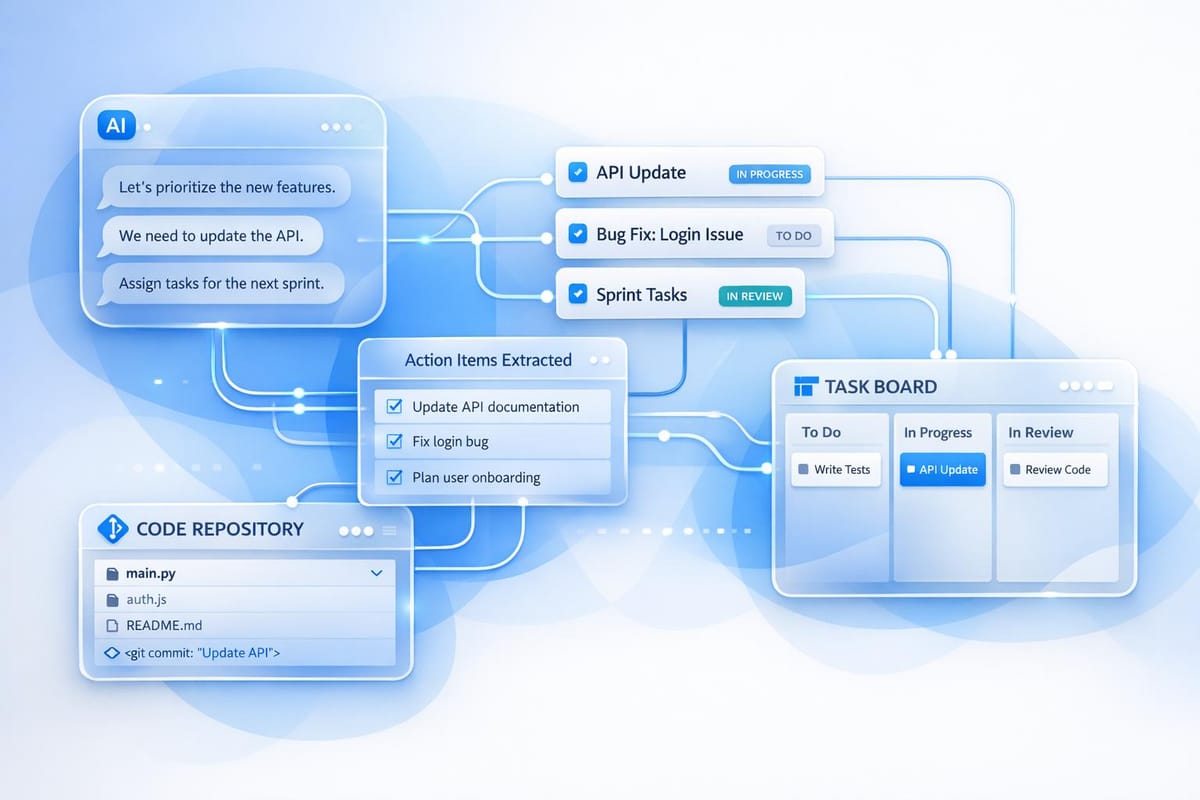
AI transcription tools, like Echother, transform sprint planning by automating note-taking, summarizing discussions, and creating actionable tasks. These tools save time, improve accuracy, and help teams focus on collaboration instead of documentation. Here's how they help:
- Real-time transcription ensures no details are missed during discussions.
- Automated summaries reduce manual documentation time by up to 90%.
- Action item extraction identifies tasks and deadlines instantly.
- Repository-aware tickets integrate directly with tools like Jira or GitHub for better task management.
- Development tool integration eliminates repetitive data entry.
- Persistent transcripts provide searchable records for better cross-team collaboration.
- Meeting analytics offer insights to refine sprint planning processes.
Teams using AI transcription report significant time savings, improved collaboration, and enhanced task clarity, enabling faster and more efficient sprint execution.
From Sprint Planning to Jira in Minutes 🤖 | AI Agent Built with Automation Anywhere
How AI Transcription Improves Sprint Planning
Sprint planning often faces a common challenge: the people making the decisions are also expected to document them. This dual responsibility can lead to incomplete or inaccurate records. It's no surprise that 77% of workers admit to attending meetings that require follow-up sessions because key decisions and their rationale weren’t properly captured[6]. Here’s how AI transcription changes the game.
By automating note-taking, AI transcription removes this roadblock entirely. Teams can save an average of 2.5 hours per employee every week, and some users report reclaiming up to 105 minutes daily[5][6]. On top of that, 85% of users experience a noticeable drop in the stress of taking meeting notes[5], freeing engineers and team members to focus on solving problems instead of jotting down details.
AI tools revolutionize workflows in three key ways:
- They take care of roughly 70% of documentation, seamlessly capturing decisions, pulling out action items, and creating summaries[3].
- They preserve the reasoning behind decisions by generating searchable records, which reduces repetitive discussions.
- They convert unstructured conversations into structured backlog items, transforming what used to take hours of manual effort into just minutes of review.
This automation also addresses a fairness issue often overlooked in team dynamics - note-taking disproportionately falls on certain team members, adding to their workload[7]. By automating this task, AI ensures that everyone can contribute equally to strategic discussions without being bogged down by administrative duties.
The result? Sprint planning becomes a more collaborative process. Instead of one person scrambling to type while others talk, the entire team can engage in real-time problem-solving, confident that every decision, technical limitation, and commitment is being captured with 99% accuracy. Fabian Kissel, CFO at Sally AI, sums it up perfectly:
"Automatic transcription allows teams to focus on the content while the technology takes over the tedious task of documentation. This keeps the focus on targeted tasks."[8]
1. Real-Time Transcription Keeps Teams Focused on Discussion
Real-Time Transcription Accuracy
Sprint planning sessions demand undivided attention. When team members juggle between participating in discussions and taking notes, it’s easy to lose track of important details. That’s where real-time transcription steps in, delivering dialogue capture with up to 99% accuracy. This allows everyone to stay fully engaged in the conversation without worrying about missing key points.
What’s more, these AI-powered transcription tools excel in tackling challenges that often trip up manual note-takers. They can handle technical jargon, identify individual speakers, and even manage multilingual conversations in over 35 languages. Whether the discussion dives into API endpoints, database schemas, or deployment strategies, the technology ensures everything is documented without interrupting the flow.
This level of precision lays a solid foundation for better teamwork, especially in distributed or fast-paced environments.
Enhancing Collaboration and Scalability
Accurate, real-time transcripts do more than just record conversations - they actively enhance collaboration, especially for remote and diverse teams. They provide an immediate point of reference, allowing team members who join late or work remotely to catch up seamlessly without disrupting the ongoing discussion.
Live transcripts also make meetings more inclusive. They’re a game-changer for participants with hearing impairments or those navigating conversations in a non-native language. Plus, every task or issue logged from the transcript is linked to a specific, timestamped part of the conversation. This ensures that even developers who weren’t part of the original discussion can revisit decisions with full context and accountability.
2. Automated Sprint Summaries Save Documentation Time
Automation of Meeting Summaries and Tasks
Taking notes during meetings often leads to a frustrating dilemma: the person most qualified to contribute insights ends up stuck scribbling notes instead of fully engaging. On average, employees spend 4.8 hours per week taking notes, and 72% admit that the records are often incomplete [5].
AI transcription flips this scenario on its head. Instead of spending hours piecing together fragmented notes, automated summaries are generated immediately after the meeting. This shift can save teams up to 30% of the time they would typically dedicate to manual note-taking, with some organizations reporting reductions in documentation time of up to 90% [5].
What truly makes this process a game-changer is the structured requirement capture. AI tools don’t just transcribe - they identify critical decisions and transform discussions into clear "Who/What/Why" formats. This method gives development teams exactly what they need to craft user stories and manage backlog items effectively. By ensuring every task is documented with clear accountability, these tools prevent important commitments from slipping through the cracks and make it easier to trace actions back to their origins [3][4]. This structured process not only saves time but also lays the groundwork for pinpointing actionable items in follow-up steps.
3. Action Item Extraction Reduces Follow-Up Work
Real-Time Action Item Extraction
One of the biggest hurdles in sprint planning is the time wasted on administrative tasks - specifically, those 10–15 minutes spent after every meeting figuring out who agreed to do what [10]. For a team of five attending 10 weekly meetings, that adds up to a staggering 104 hours a year lost to post-meeting chores [10].
AI-powered real-time natural language processing (NLP) offers a practical fix for this. By analyzing conversations as they happen, AI can separate clear commitments from casual remarks. For instance, if someone says, "I will handle the API integration", the system flags it as an actionable task. On the other hand, a comment like "We should consider the API approach" is categorized as a discussion point rather than a to-do item [10]. This ability to understand context ensures that action items are identified and displayed during the meeting itself [1].
The system goes a step further by converting vague deadlines like "by next Friday" into specific calendar dates. It can even link action items to relevant local files or CRM data mentioned during the conversation [10]. This streamlined process allows teams to move quickly from discussing plans to executing them.
The benefits are clear: using AI for action item extraction results in a 519% return on investment, purely from labor cost savings [10]. Beyond just saving time, this efficiency helps teams focus on more strategic tasks. With structured summaries and actionable tasks delivered within minutes of a meeting, teams can hit the ground running [2, 14].
4. Repository-Aware Ticket Generation Creates Better Task Scoping
Integration with Codebases and Development Tools
AI transcription tools now work directly with your codebase, creating repository-aware tickets that align perfectly with your workflow. By integrating with platforms like GitHub and Jira, these tools organize new tasks into epics, stories, and sub-tasks while maintaining their correct relationships and hierarchy [12].
In November 2025, Muhammad Samiullah, a Solution Engineer at Mazik Global, ran an internal experiment using GitHub Copilot on a 40-page workshop transcript. Acting as a consultant, the AI converted the transcript into a structured summary, complete with key topics, timestamps, and auto-generated GitHub Issues for "in-progress" and "next" tasks. What would typically take hours of backlog grooming was completed in just minutes. Every issue was traced back to its original context, streamlining the process and improving efficiency [3]. This capability highlights how automated ticket generation can refine task scoping.
Automation of Meeting Summaries and Tasks
AI takes automation a step further by refining task details based on meeting context. Beyond simply transcribing discussions, it auto-populates ticket details, speeding up sprint planning. For instance, when a feature is discussed during planning, the system can automatically assign story points, designate components, and set priorities. This ensures developers have the "Who/What/Why" they need to get started right away [3][12][13].
The results speak for themselves. Teams using AI-driven ticket generation report 90% task accuracy and save 75% of the time usually spent on project management [12]. A fintech startup, for example, integrated GitHub Copilot and ClickUp AI between March and June 2025. Over 90 days, the team boosted its sprint velocity from 18 to 24 story points - a 35% improvement - and reduced monthly production bug leakage from 15 to 6, a 60% decrease [14].
This workflow strikes a balance between automation and human input. Typically, AI handles around 70% of documentation and ticket drafting, while the remaining 30% is fine-tuned by humans for domain-specific insights [3]. This division ensures technical accuracy while eliminating the repetitive administrative tasks that often consume up to 10% of a team's sprint capacity [11].
5. Development Tool Integration Creates Smooth Workflows
Integration with Your Favorite Development Tools
Echother works seamlessly with popular tools like GitHub, JIRA, Microsoft Teams, Google Meet, and Zoom, transforming live discussions into structured tickets. No more manual data entry - sprint planning decisions are automatically added to your development backlog.
But Echother doesn’t stop at syncing tasks. During sprint planning, it captures discussion points in real time and turns them into actionable tasks, complete with technical context pulled directly from your codebase. This means every ticket is ready for development the moment it’s created. By eliminating repetitive manual steps, Echother makes in-meeting task management a breeze.
Automated Summaries and Real-Time Task Updates
Echother simplifies post-meeting follow-ups with real-time summaries and action items. Team members can create, update, or query tasks using simple commands, ensuring that every decision is documented on the spot. With a transcription accuracy of 99%, Echother captures every detail, saving time and reducing the risk of missed information.
Supporting Collaboration and Clear Documentation
Echother goes beyond task management to improve team collaboration. It ensures updates, transcripts, and summaries are delivered directly to the communication channels your team uses most. Whether your team spans multiple time zones or works on flexible schedules, everyone stays in sync.
To top it off, Echother’s standardized templates ensure consistent documentation every sprint, making it easy to revisit key decisions and action items. These features work together to streamline workflows, keeping your team focused and efficient during sprint planning.
6. Persistent Transcripts Improve Cross-Team Collaboration
Support for Cross-Functional Collaboration and Scaling
Sprint planning meetings are often packed with crucial details, but too often, that information fades away once the meeting ends. Persistent transcripts solve this problem by creating a searchable record of every technical decision, design conversation, and clarification of requirements.
When product managers, developers, and functional consultants work from the same reliable source, staying aligned becomes much easier. These transcripts don’t just document what was decided - they also capture the reasoning behind those decisions. This ensures that teams, whether on-site or remote, can maintain continuity across sprints and projects without losing context.
The impact is clear. 90% of users reported better team collaboration after adopting AI transcription tools, and 62% of employees are more likely to leave a company if they can’t easily access the information they need to perform their jobs [5]. For distributed teams, these transcripts are especially valuable, allowing those who couldn’t attend to review the full discussion and understand the thought process behind every decision.
Echother takes this a step further by storing these transcripts and integrating them into your team’s communication tools. Whether someone joins a project months later or needs to double-check a commitment made during sprint planning, the entire conversation history is just a search away.
7. Meeting Analytics Help Teams Improve Sprint Planning Over Time
Leveraging Data for Continuous Improvement
AI transcription offers more than just convenience - it provides a way to analyze patterns across multiple sprints, helping teams refine their processes over time. By reviewing transcripts from the past three to five sprints, teams can pinpoint recurring issues, identify topics that consistently slow down planning, and spot decision-making habits that either speed things up or create delays [9]. This data-driven approach doesn’t just enhance sprint planning - it builds on the earlier benefits of AI transcription, making it an invaluable tool for continuous improvement.
Here's a striking example of how effective automation can be: strategic AI users save up to 105 minutes per day on meeting-related tasks [6]. Yet, a staggering 77% of workers still find themselves stuck in meetings that only lead to scheduling yet another follow-up [6]. Meeting analytics tackle these inefficiencies head-on by exposing patterns and inefficiencies, enabling teams to make smarter adjustments for future sessions.
Echother’s meeting analytics take things a step further by not just transcribing conversations but also tracking how discussions evolve across sprints. Need to revisit why a decision was made? Teams can search through their entire transcript history to find the reasoning behind past choices, eliminating the need to rehash old debates. This creates a valuable institutional memory, preserving technical decisions and their context long after the meeting wraps up [2][15]. By integrating these insights into sprint planning, teams can fine-tune their workflows and improve with every iteration.
Comparison Table
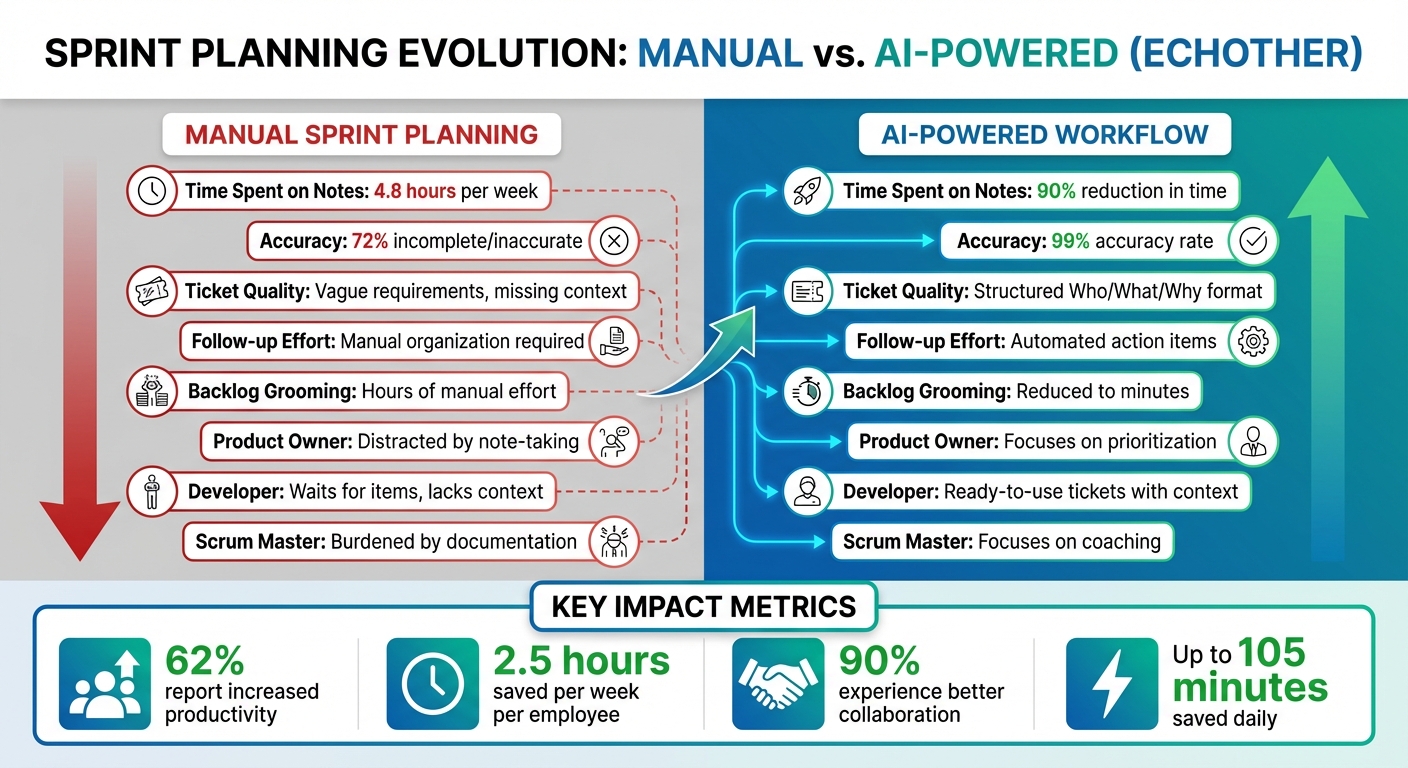
Manual vs AI-Powered Sprint Planning: Time Savings and Accuracy Comparison
Manual sprint planning and AI-powered approaches differ in several critical ways. Traditional methods demand 4.8 hours per week for manual note-taking, with 72% of employees citing incomplete or inaccurate notes [5].
AI transcription revolutionizes this process. Teams can cut transcription time by as much as 90% [5], while achieving an impressive 99% accuracy. A real-world example: In November 2025, Muhammad Samiullah condensed a 40-page transcript into a concise two-page blueprint in seconds [3]. This innovation turned hours of manual backlog grooming into mere minutes, enabling instant user story creation and seamless GitHub updates [3].
This shift allows product owners to focus on prioritization rather than note-taking, developers to receive fully contextualized backlog items, and scrum masters to lead discussions without the distraction of documentation. As one expert aptly put it:
"AI is not just about automation; it's about alignment. It bridges the gap between what we discuss in meetings and what we deliver" [3].
Here's a breakdown of the differences between manual and AI-powered sprint planning:
| Feature | Manual Sprint Planning | AI-Powered Workflow (Echother) |
|---|---|---|
| Time Spent on Notes | ~4.8 hours per week [5] | Up to 90% reduction in transcription time [5] |
| Accuracy Levels | 72% reported as incomplete/inaccurate [5] | 99% accuracy capturing every detail |
| Ticket Quality | Vague requirements, missing "why" context [2] | Structured "Who/What/Why" format with timestamps [3] |
| Follow-up Effort | Manual organization and distribution [4] | Automated action items and instant recaps [4] |
| Backlog Grooming | Hours of manual effort [3] | Reduced to minutes [3] |
| Product Owner Impact | Distracted by note-taking [3] | Focuses on stakeholder feedback and prioritization [3] |
| Developer Impact | Waits for structured items, lacks context [3] | Receives ready‑to‑use tickets with meeting context [3] |
| Scrum Master Impact | Burdened by facilitation and documentation [9] | Focuses on coaching while AI handles notes [9] |
These distinctions highlight how AI transcription transforms sprint planning for every team role. Companies adopting this technology report tangible benefits: 62% note increased productivity, with employees saving an average of 2.5 hours per week [5].
Conclusion
The advantages of AI transcription are undeniable. Sprint planning should boost productivity, not drain it. By removing the hassle of manual note-taking, AI transcription achieves an impressive 99% accuracy rate. Muhammad Samiullah's experience highlights this efficiency, turning what used to be hours of backlog grooming into just minutes of focused, productive work [3][5].
But the benefits go beyond just saving time. Research shows that 90% of users experience better team collaboration, while 62% of companies report noticeable productivity gains [5]. For product owners, this means they can concentrate on prioritizing stakeholder feedback without worrying about jotting down notes. Developers benefit from fully detailed, context-rich tickets that are ready for action. Meanwhile, Scrum masters can lead discussions without the distraction of documentation tasks.
"AI is not just about automation; it's about alignment. It bridges the gap between what we discuss in meetings and what we deliver." - Muhammad Samiullah, Solution Engineer, Mazik Global [3]
Echother combines real-time transcription, intelligent ticket creation, and seamless integration with your tools to reshape your workflow. With the Developer plan, you get 15 minutes of free recording time - enough to see how AI transcription can enhance your next sprint planning session. Let Echother handle the documentation, so your team can stay focused on creating outstanding software.
FAQs
How can AI transcription enhance teamwork during sprint planning?
AI transcription takes sprint planning meetings to the next level by converting spoken discussions into real-time, searchable text. This means everyone in the meeting can stay on the same page, ensuring their thoughts and ideas are accurately recorded. It also helps clear up any confusion right away, as team members can ask for clarification immediately. For remote participants - whether they're in a different time zone or working from home - live transcripts ensure they’re just as connected, cutting out the delays that come with manual note-taking.
On top of that, AI transcription tools don’t just stop at capturing conversations. They automatically summarize key decisions, action items, and requirements, linking them to tools like Jira for easy integration with backlog items. This reduces the burden of documentation, allowing the team to focus on fine-tuning priorities and planning more effectively. Plus, having a searchable archive of past discussions makes it easy to revisit decisions, boosting transparency and accountability across the entire sprint cycle.
What are the benefits of using AI transcription with development tools during sprint planning?
Integrating AI transcription into your development tools can make turning meeting discussions into actionable tasks a breeze. Imagine this: transcripts automatically syncing with platforms like task trackers, creating backlog items, assigning team members, and setting deadlines - all in real-time. No more tedious manual data entry, and every decision gets recorded right where your team manages its work.
But it doesn’t stop there. AI transcription can take planning to the next level by analyzing conversations to draft user stories, connect tasks to larger epics, and even suggest priorities based on past trends. This gives Scrum Masters the ability to distribute tasks more efficiently, spot potential roadblocks early, and keep the backlog well-organized. The result? Time saved and a team that's more aligned and productive.
How does AI transcription deliver accurate and reliable meeting records?
AI transcription provides a reliable way to capture meeting records with precision, thanks to its advanced audio processing and language modeling capabilities. It effectively minimizes background noise, balances audio levels, and distinguishes between speakers, even in challenging environments like virtual calls or noisy rooms. These systems are designed to handle various accents, industry-specific jargon, and contextual nuances, while automatically inserting punctuation and proper capitalization to enhance readability.
Key features like speaker identification and confidence scoring further refine the transcript. Sections with lower confidence can be flagged for manual review, ensuring that critical points - like decisions, action items, and discussions - are accurately documented. This creates a dependable resource for teams, making sprint planning and collaboration much smoother.